You will have to sit down and work on it. A simple 'adjust the white balance' approach will not work, because the light that you are getting is not from a black-body source for which color temperature has meaning. You are working with specific frequencies of light from a fluorescent or discharge source. As such, you need to look at steps to getting that light into something that approximates a traditional blackbody curve that you can work with.
The ideal case would be to turn off all the HID lights, put on some broad spectrum or incandescent lights into the scene, or photography by daylight. That way, you don't have to worry about the frequencies of the specific light and can carry on as normal. This probably isn't the case.
A quick and simple thing to try (I make no guarantees that it will work) is to use a didymium filter that can take a chunk of the yellow that is associated with the sodium line out of the image.
For sodium vapor (a significant portion of light pollution for night photography), you've got:
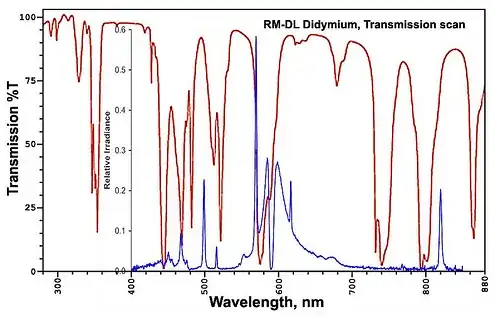
The red line is a filter known as a didymium filter and it does a good of at blocking the yellow from the sodium line. It will also block some of the other light around it. This particular filter is also known as a 'red enhancer' and can be commonly found in photography stores. Its something to try, though I won't guarantee that it will work, but it's a relatively cheap approach for a single filter that might work for what you are after.
Ok, the didymium filter didn't work to the degree that you wanted.
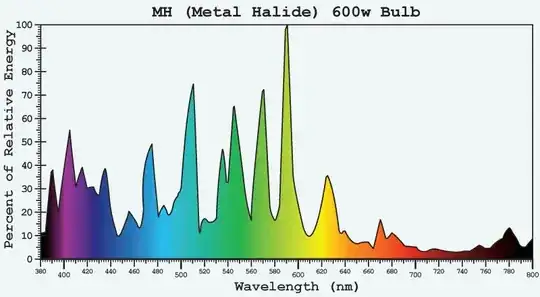
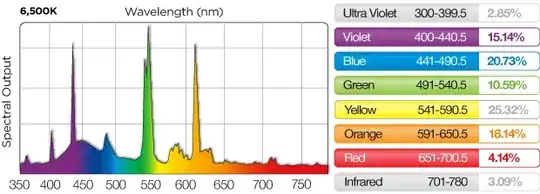
Lets look more closely at some examples of a metal halide light's spectra:
and compare it to the sun:
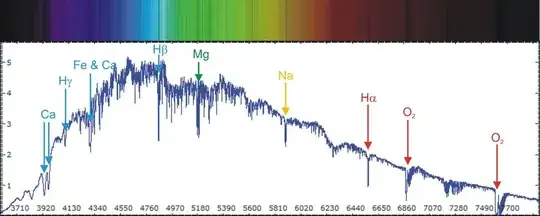
You will see that the sun is relatively smooth (it has some narrow gaps that correspond to the absorption of specific elements). Thus the ideal is to reduce those strong, preferably as narrowly as possible (though this may not always be an option).
Working from page 16 of Rosco Filter Facts mentioned by Iliah Borg in another answer, we've got the 'lamp groups' in the 'D' section. Note that the low pressure sodium (which would be the easiest to block) is also the least likely that you have there. You are interested in the 'discharge lamp to daylight' (5500K) or 'discharge lamp to tungsten' (3200K). The filters will then correct. Note that its often a fair bit of filters you're going to be stacking on this. You're looking at a CTB and Minusgreen filter in most cases as described in the page.
The 3/4 CTB has a mired shift of -100. While you may not be able to find the Rosco product 3203, a -100 MIRED filter is half way between an 80C and an 80B filter. You could likely use either of those, or stack an 80B with an 82A which is a -21 MIRED (the MIRED shifts can be added so a -81 (80C) + -21 (82A) gives you a -102). Note that this will cost you about 1.3 stops of light - make sure you have a tripod. Note that you may be able to use the color temperature adjustment in the camera or post to account for this correction (though how to use/understand mired for making adjustments from one temperature to another could well be its own question).
The other component that is seen is a minus green. These are CC series filters. A CC30M is a filter that is magenta in color and has the effect of removing the color directly opposite it on the color wheel, in this case, green.
Ideally, you will get several of these filters (the 80 series and some CCMs) that you can have in combination and can stack as appropriately to get the right color.
The spectrum of the CCM series filters can be seen:
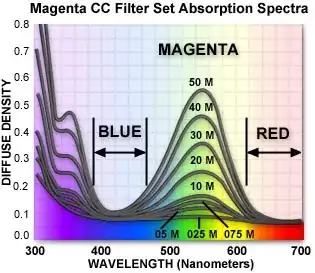
Note that this graph is showing density rather than transmission and is blocking the violet and some of the green and yellow while allowing the blue and red light to go through.
I will point out that his may not be sufficient to just use a CCM filter (some of the lighting combinations in the Rosco document had more complex lighting combinations. From an old document that Kodak had for filters under HID lighting it had this table:
       | High Pressure | Mercury | Metal Halide | Metal Halide
       | Sodium 2700K  | Vapor   | 4300K        | 3200K
-------+---------------+---------+--------------+-------------
(print)| -             | -       | -            | -
 Porta | -             | -       | -            | -
  160  | 50B+70C       | 30B+05C | 05C+10M      | 80C+10M
  400  | 50B+70C       | 30B+05C | 05C+10M      | 80C+10M
  800  | 60B+50C       | 30M     | 05R+20M      | 20B+30C
 Supra | -             | -       | -            | -
  100  | 55B+50C       | 30M     | 50R+20M      | 50C+20M
  400  | 55B+50C       | 20B+30M | 30M+05Y      | 30B+05C
  800  | 60B+50C       | 30M     | 05R+20M      | 20B+30C
For the 3200K metal halide working with a specific film, it was suggesting an 80 Cyan and 10 magenta filter or a 20 blue and 30 cyan, while a high pressure sodium light needed 50 blue and 70 cyan correction. Note that this table is for specific film emulsions - a digital sensor may very well be different.
Next, you would take a photograph of a gray card. With the information from the gray card, you can look at the histogram provided and see if the R/G/B channels are appropriately balanced with each other. If there is too much blue, back off on the 80 series. Too much green? Add some more magenta. Its like leveling a tripod... except with color - and its much easier to work with it in post if its all balanced out before hand rather than trying to correct it later.
You may wish to get a color checker card. This way, once you get the histogram close enough, you take a picture of this can then do additional corrections in post production against specific known targets.
One of the important things to note in all of this is that you cannot remove specific frequencies of light in post production. You can alter entire channels, but you can't go back and say "you know, there is too much light from the 589nm source, lets cut that back." That is something that is best done with filters.


