3

enter image description hereenter image description hereI'm new to interchangeable lenses, but I bought the Sony 55-210mm lens to go with my new A6000 based on good reviews. I have no problems with the quality of images with the kit lens. They are nice and sharp.

With the 55-210mm, images are sharp and crisp at 55mm, but when I zoom out to 210mm the image quality is very bad.

I'm talking bright sunlight and in the middle of the day with a tripod. If I focus on something that is "unclose" at 210mm, then the image quality seems fine.

But, if I am focusing on something much further a way, the image quality is unusable.

If I can illistrate, let's say straight objects should have sharp lines like this.


the objects in view are like this...

-===-------------

fuzzy, and distorted kind of like how I described it above.

I'm using manual mode - 6.3 - 1/4000.

At lower shutter speeds, for example 1/250, the result is the same.

Is it just because, I simply can't focus well on very distant objects with my current setup?

user1060500
  • 181
  • 1
  • 2
  • 8
  • Can you post an image with the issue? – rfusca Apr 20 '14 at 20:29
  • I tried. But I got an error and the page crashed. I will try again soon and see what I can do. – user1060500 Apr 20 '14 at 20:31
  • 4
    As you're talking about shooting in bright sunlight in the middle of the day, I suspect refraction is going to be having a significant effect here. But upload a photo and we'll be able to help a lot more :-) – Philip Kendall Apr 20 '14 at 20:50
  • Depending on the size of the A6000's pixels, at f/6.3 diffraction may also be beginning to affect acutance. – Michael C Apr 21 '14 at 01:10
  • 1
    Without a example, this question is just pointless handwaving and guessing. – Olin Lathrop Apr 21 '14 at 13:16
  • @OlinLathrop Sure. But the original poster has at least tried to upload an image, and this was only posted yesterday. Let's give it a couple of days to turn itself into a better question before closing it. – Philip Kendall Apr 21 '14 at 20:57
  • I will do my best to get a picture up soon... – user1060500 Apr 23 '14 at 15:10
  • I tried uploading again, but I get the same error "Framing is not allowed" followed by a crash. We apologize for any inconvenience, but an unexpected error occurred while you were browsing our site.

    It’s not you, it’s us. This is our fault.

    Detailed information about this error has automatically been recorded and we have been notified.

    Yes, we do look at every error. We even try to fix some of them.

    It’s not strictly necessary, but if you’d like to give us additional information about this error, do so at our feedback site, http://meta.photo.stackexchange.com.

    – user1060500 Apr 23 '14 at 20:54
  • I'll have to find another place to host the image... – user1060500 Apr 23 '14 at 20:54
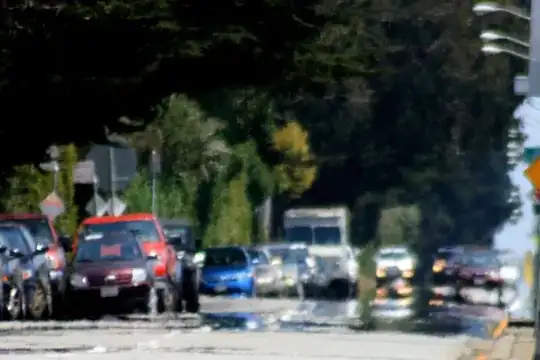
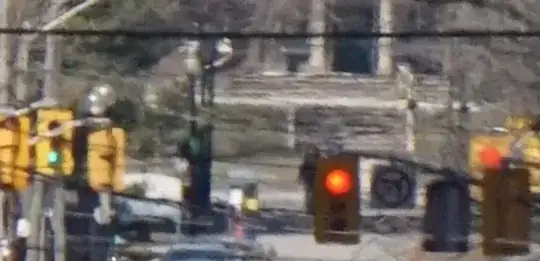
  • Added photo at 100% crop and one zoomed in a little more. You can see straight edges are not straight and are distorted. – user1060500 Apr 24 '14 at 01:03
  • It's like a wavy look. The kind of distorted view you would see through gasoline fumes.... – user1060500 Apr 24 '14 at 01:03
  • Heated air between you and focused area. http://www.wisegeek.com/why-do-things-look-wavy-in-the-heat.htm – Esa Paulasto Apr 24 '14 at 02:14
  • I understand, and that's how it looks. This was taken on a cold day, however. This same refraction does not exist, let's say, if you use a pair of binoculars with the same length you will see the edges sharp and crystal clear without any refraction. – user1060500 Apr 24 '14 at 02:59

2 Answers2

5

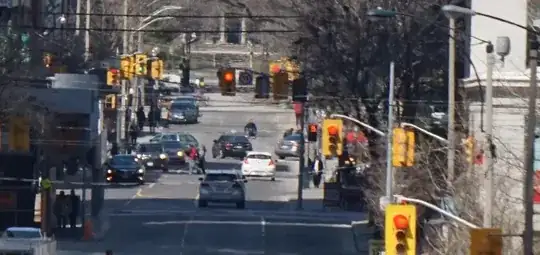
Heat haze is almost certainly what you're seeing (possibly in conjunction with the camera's noise reduction - what ISO are you using?). It can occur on cold days just as much as on hot days; it is caused by differences in air temperature, not absolute temperature, and it's especially common above asphalt or concrete masses heated by sunlight - as in your picture. Here's another example:

enter image description here

You write:

This same refraction does not exist, let's say, if you use a pair of binoculars with the same length you will see the edges sharp and crystal clear without any refraction.

"Let's say" doesn't sound like you've actually done that. Besides, it would not be comparable because those distortions are constantly moving, and our brain is pretty good at averaging out that kind of non-systematic distortion and giving us the perception of higher resolution than our eyes actually have.

Michael Borgwardt
  • 4,644
  • 16
  • 25
  • ISO 1000, 1/4000, f6.3 – user1060500 Apr 24 '14 at 16:29
  • Thanks - so, how can I make these longer shots better? A faster, sharper telephoto lens? – user1060500 Apr 24 '14 at 16:31
  • 1
    @user1060500: reducing ISO as much as possible might help a little, but will probably just make the artifacts more recognizable as atmospheric distortions rather than general blurriness. It's not an issue you can fix with better equipment or technique - this kind of thing is the reason why the most expensive optical equipment on earth is put on top of mountains or in space rather than where it's convenient. – Michael Borgwardt Apr 24 '14 at 18:55
  • The only thing you can do against bad atmospheric conditions is to avoid them: don't shoot directly across roads or roofs heated by sunlight; shooting from a higher-up position might help, and shooting later in the day, near sunset, will definitely help. – Michael Borgwardt Apr 24 '14 at 18:58
  • Interesting. I will try shooting around sunset just to see if I can get the desired outcome. Sunset, means less light. This means higher ISO, lower shutter - which introduce their own problems with graininess and motion.... :) – user1060500 Apr 24 '14 at 21:32
  • On the plus, I'm glad the problem is not my new A6000 :) Based on another comment, maybe a lower f-stop in the lens might prevent some acutance... That's a lens issue though. – user1060500 Apr 24 '14 at 22:30
  • @user1060500: I don't think changing aperture will help with this particular problem, but experimenting with different settings is always good. As for sunset, you don't have to wait until the light is gone, just until it doesn't heat up the surfaces as much. – Michael Borgwardt Apr 24 '14 at 22:36
2

My question might be stupid but is this a .jpg picture from the camera or have you manipulated yourself a camera RAW file? From what I have read about the a6000 (a lot because I ordered one)is that its in-camera jpg processing is too heavy handed, sacrificing the resolution to an unacceptable degree.

If this picture is indeed a camera .jpg, you could easily take another series of shots in RAW format and see what happens. I hope your problem goes away. In that case you might want to tweak the settings for in-camera noise reduction and sharpening to get a more pleasing result for your JPEG shots.

Courage!