3

I have a Nikon 100mm f/2.8 Series E mounted on my D300. When I set the aperture on 2.8 on the lens, it is seen as 1.8 on the D300. At its maximum, when set at f/22 on the lens, it is seen at f/16 on the D300. At any aperture, the D300 sees the lens at 1 stop difference from real.

What can cause that and how may I force the D300 to properly recognize the good aperture set on the lens ?

Edit 1 : There is no exposure compensation set

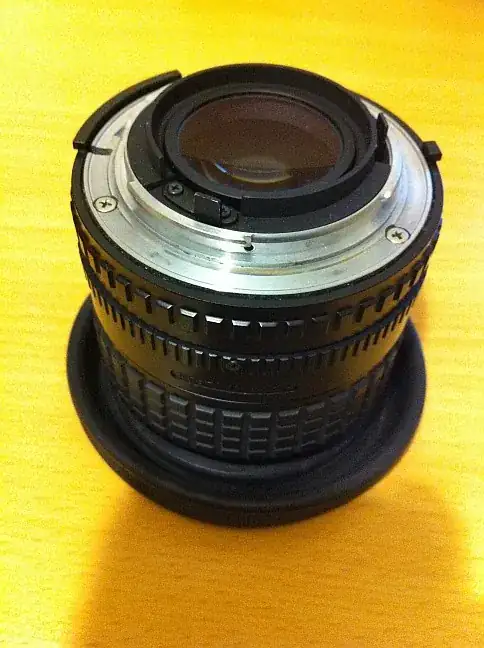
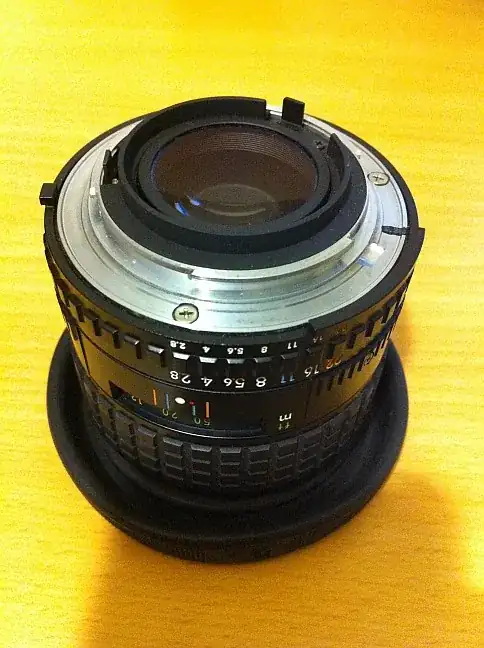
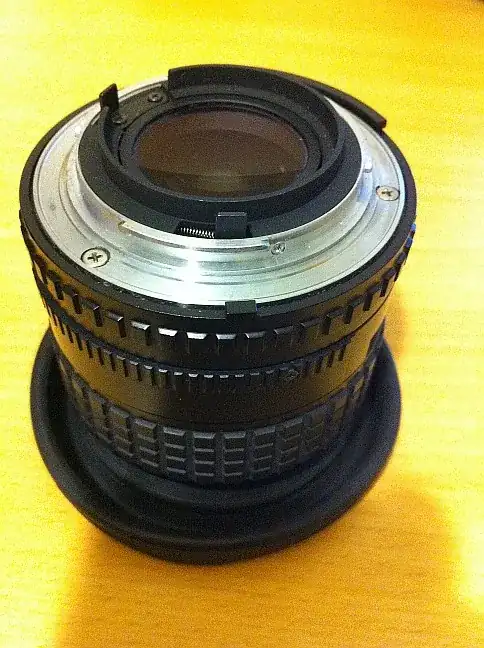
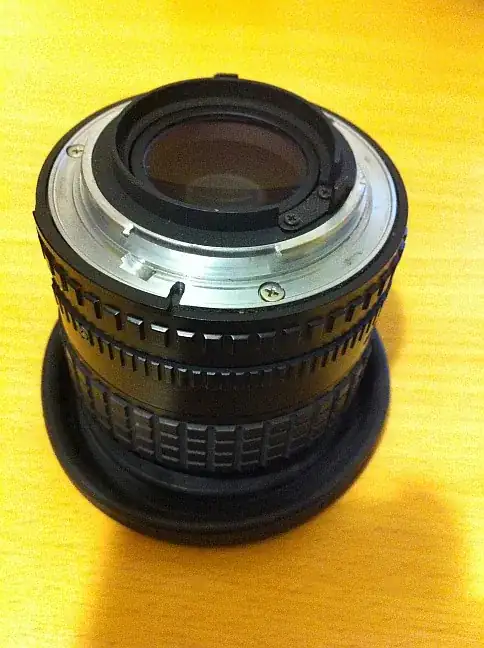
Edit 2 : Some pics of the mount from each side

1 2 3 enter image description here

Oliver
  • 902
  • 1
  • 9
  • 18
  • 1
    You've checked the contacts to make sure they're clean? – Joanne C Jun 10 '13 at 17:57
  • JoanneC: I don't see any contact on the lens itself or any place where there should be contacts. The contacts on the D300 are pure and clean. – Oliver Jun 10 '13 at 18:03
  • Ah.. it's a manual lens, no? However, I can't find a 200mm prime in Series E documented. Either way, you might want to have a look at this question: http://photo.stackexchange.com/questions/8343/why-is-my-nikon-50mm-f-1-8-giving-me-an-fee-error – Joanne C Jun 10 '13 at 18:38
  • JoanneC: yes, it's a manual lens. But this has nothing to see with the problem stated by this other question. I can (and I am surprised to be able to) set any aperture on the lens ring, and the camera automaticaly recognize it, even if a little error as stated. I have been used to set the aperture to 22 to be able to control the lens with the camera, but with that one, it's not needed. – Oliver Jun 10 '13 at 18:55
  • When you do put it on f/22 and adjust to another value with the camera, does it work and give the right value? I'm suggesting that it may need that to work that way to get the correct EXIF. – Joanne C Jun 10 '13 at 18:59
  • JoanneC: no, setting the aperture on f/22 does not allow to take control of the lens from the camera – Oliver Jun 10 '13 at 19:04
  • Maybe that's because of the crop factor. Was the lens designed initially for 35mm? What is the size of the sensor in the D300? – comocomocomocomo Jun 10 '13 at 19:04
  • @comocomocomocomo:I'm not very convinced with that idea :-) Do you really think it is the cause of the problem ??? Why would it be so exact on a 1 stop error ? The crop factor is 1.5, not 2. – Oliver Jun 10 '13 at 19:06
  • 1
    It's just an idea. I'm not an expert. Though, note that 1.8/1.4=1.286, and 22/16=1.375. One stop is a ratio of 2 in the area, but this is achieved by a ratio of 1.4142 (the square root of 2) in the diameter of a circle or the side of a rectangle. – comocomocomocomo Jun 10 '13 at 19:38
  • @comocomocomocomo:yes, of course. Oooops – Oliver Jun 10 '13 at 20:06
  • @comocomocomocomo sensor/film size is irrelevant here. The lens lacks the D chip contacts (not surprising as it predates the D chip system). It has purely mechanical linkage, which might be somehow damaged, hard to tell from these pictures. – jwenting Jun 11 '13 at 05:55
  • The damage could also be on the camera's linkage. See http://www.borrowlenses.com/blog/?s=is+the+6D+underexposing%3F – Michael C Jun 12 '13 at 01:52
  • I do not find any reference for a 200mm Serie E. Are you sure it is not a 20mm ? – рüффп Jul 15 '13 at 19:18
  • @ruffp:My bad, it is a 100mm, sorry for the inconvenience. – Oliver Jul 16 '13 at 17:17
  • Ok, then you can also edit the text inside the question not only the title, anyway my answer still apply (and updated it). Did that fix your issue? – рüффп Jul 16 '13 at 18:36

3 Answers3

4

For that kind of lenses (all without CPU, mainly all manual focus, except the AI-P ones) you have to "declare" them in the SETUP MENU and then Non-CPU lens data if you intend to use the body's metering and selection of aperture.

  1. Choose a free lens number (1 to 9)
  2. Give the focal length (mm) (100mm in your case)
  3. Set the Maximum aperture (F/2.8 in your case)

That way your D300 will know you are at the right aperture.

Do not forget to set the seeting f7 - Aperture setting to Aperture ring as well if you want to use the original aperture ring from the lens.

By doing this you also benefit of the Matrix metering (Color but not 3D) for this old lens.

Nomaru
  • 196
  • 4
рüффп
  • 839
  • 3
  • 17
  • 32
  • Nothing serious but in 3., you wrote "minimal aperture" instead of "maximal aperture". – Jon Jul 16 '13 at 13:00
  • Thanks, I corrected with the same text like in the camera. I was thinking the minimum number (equivalent to maximal aperture) :) – рüффп Jul 16 '13 at 18:31
2

There are 2 mechanical contacts on the bayonet ring, little metal tabs. One can move, the other is fixed in place. In your top picture you can see the spring that keeps the second in position, and in all of them some wear on the contacts is visible (this is normal, nothing to worry about). The spring loaded one is triggered by the camera to force the aperture open and closed as needed during exposure. The other AFAIK is for calibration/alignment purposes.
There's a third tab on the aperture ring, which on your lens looks suspiciously small, maybe too small to make proper contact with the matching tab on the camera body. this is the tab that communicates the set aperture value to the camera. If it doesn't link up with the matching tab on the camera body, the camera can never know what value is desired.
Mind that this does look consistent with other E series Nikon lenses, so it's not broken :)
And according to this site you're out of luck as the E series does not have meter linkage prongs. More information on the E series here (mind there is another Nikon E series, which are early professional DSLRs, we're talking about the old E series lenses of course).

In short, looks like you're going to have to go full manual using this lens (whichever focal length it is, there is no 200mm Nikon E prime, the longest is 135mm).
jwenting
  • 4,949
  • 1
  • 18
  • 22
  • Where is the "suspiciously small" tab you are talking about ? Today I can use the lens in "S" mode. The light metering seems to works well, even if the aperture seen by the body is 1/3 wider than it is really. But perhaps I don't see the exposure problem as 1/3 would not show a big difference. – Oliver Jun 11 '13 at 11:06
  • the tab on the aperture ring looked rather small, but that could well be the angle of your pictures. – jwenting Jun 11 '13 at 12:35
1

I don't know Nikor lenses that well and can't find any documentation on a 200mm f2.8 Series E prime, but if it uses a pin to physically communicate the aperture setting instead of an electronic signal, then it sounds like the depth it is depressing is out of calibration. If it is pushing too little or too far, then it would misregister on the camera body. You could adjust it by either adding or subtracting material from the pin.

Note, this only applies if the lens uses a physical pin to indicate aperture to the camera body. You should be able to verify by looking at the lens mount as you adjust the aperture. It should also let you determine which direction it is off by.

Update: I found this blog posting with a lot of great info and pictures of how the various aperture settings on Nikor lenses have been communicated with the camera body over the years.

AJ Henderson
  • 34,864
  • 5
  • 54
  • 91