2

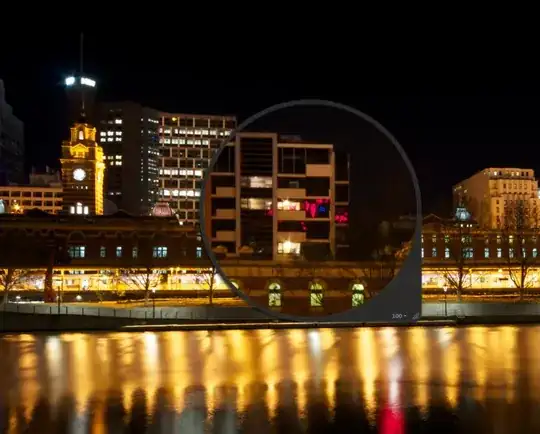
I have only started shooting in RAW and have noticed pink spots on them. They are never in the same location and don't affect some photos, they just seem to appear every few shots. It never happened when I shot using JPEG (setting "L"). It only happens in RAW. I have a Canon 550D. I have added a pic showing what I mean. Any advice would be great, thanks.

enter image description here

MikeW
  • 33,408
  • 10
  • 88
  • 123
Kelvin
  • 133
  • 1
  • 6
  • Could you post another example showing the same thing in a different scene? (Does it change based on the contents of the scene?) – mattdm Jun 17 '12 at 03:48
  • ill try upload another one, it is normally one or two pink spots here or there...but never in a cluster as big as this...in this case i took 3 shots with different settings a minute or so apart and the pink dots showed up in the same spot all 3 times..same as this one..i havent tried it in daylight yet... – Kelvin Jun 17 '12 at 04:58
  • 9
    I ask because the reflection in the water suggests that there's some actual bright pink light somewhere. Are you using a UV filter to protect your lens? – mattdm Jun 17 '12 at 12:21
  • 1
    That appears to be coming from the interior of a building or reflections of something else, like a advertising sign, off the windows. It's not clear at all that the pink isn't supposed to be there. – Olin Lathrop Jun 18 '12 at 00:46
  • oh the pink in the water is from another sign higher up which i have cropped out....that one is fine..its just those dots..i do have on a UV filter yes. – Kelvin Jun 18 '12 at 05:58
  • @olin, nah you can see the pink is on the walls of the building.. – Kelvin Jun 18 '12 at 06:17
  • What if you try to open your raw with the canon software ? Or any other raw program ? – Oliver Jul 12 '12 at 23:59
  • 1
    And what if you shoot in JPG+RAW mode, on the JPG file ? – Oliver Jul 12 '12 at 23:59
  • @Kevin Filters can create strange reflections - have you tried without the UV filter? And what do you need one for anyway? (And no, in most cases protection is not a good argument) – DetlevCM Dec 18 '12 at 14:09
  • 1
    IMO unlikely it's anything to do with RAW vs JPG. @Oliver's suggestion is a good one, shoot RAW+JPG and see if you see these in the JPG too. – MikeW Feb 16 '13 at 21:31

3 Answers3

2

The pink spots are reflections in the building's windows from (I would assume) whatever is making the equally pink reflection in the river.

Unless you can post several dissimilar images displaying the pink spot issue I don't think we're going to be able to give a more comprehensive answer.

BobT
  • 6,734
  • 1
  • 23
  • 37
1

The large pink spots in the image look like they should be there from the out of shot light source as it isn't on the white/beige wall parts and interacts with the edges on the black/glassy panels.

But there are other problems from the 100% view area. There is a white spot with some surrounding distortion just above the middle arched window at the bottom. That bright spot could be the sign of a dead pixel on the sensor.

You don't have to pixel-peep to see the distortion which comes about because in the 550D the raw format is not truly raw but a mildly applied lossy compression. This effect is not unique to that camera and my Nikon is the same. And because the JPEG (if it's different) is likely to be based on the actual raw data so may be able to compensate better.
James Snell
  • 9,709
  • 25
  • 39
  • 3
    "the 550D the raw format is not truly raw but a mildly applied lossy compression". I'm curious, do you have a reference for this? If this was true, why aren't photographers up in arms about this? I always assumed that the compression was lossless. – Chinmay Kanchi Dec 18 '12 at 14:56
  • @ChinmayKanchi Maybe that's referring to the sRAW formats? I don't know if the 550D supports them. – user Dec 18 '12 at 15:13
  • To be honest few people would spot it as it is quite mild, but it's definitely there. You just need to apply some very severe level adjustments in post processing and it basically jumps out at you... – James Snell Dec 18 '12 at 16:00
0

It is possible that your images are partially corrupted. This most likely would be the result of a bad card. You should try taking photos with a different card. Otherwise, I don't know what it could be. You should probably contact Canon's tech support.

Evan Pak
  • 1,272
  • 1
  • 11
  • 31
  • 2
    A corruption in the image data would not yield this error as the files image portion of the file contains 'checksums' which would fail if there was file corruption. – James Snell Dec 18 '12 at 14:06