4

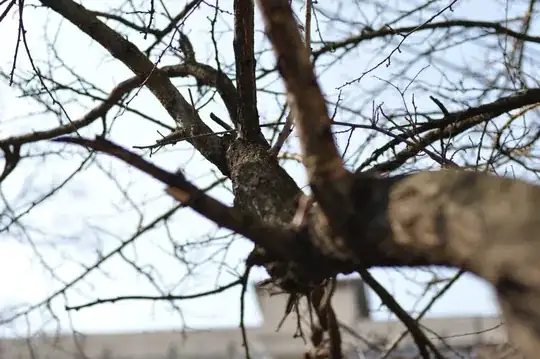
I have looked on my new 50mm lens photo (I have Nikon D90) and I see "purple fringing" around the unfocused objects (longitudinal chromatic aberration). What's is going on? Is it common for this lens (Nikon 50mm f/1.4D) or I did something wrong?

enter image description here

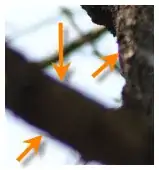
more detail:

enter image description here

mattdm
  • 143,140
  • 52
  • 417
  • 741
garik
  • 1,469
  • 3
  • 18
  • 36

2 Answers2

15

What you're seeing is longitudinal chromatic aberration (otherwise known as axial colour), whereby the light at the edge of the bokeh disc undergoes a colour shift depending on whether it is in front of or behind plane of focus. The reason for this is that light of different wavelengths focus at different distances along the axis of the lens.

This is very common of ultrafast lenses like your 50 f/1.4 and is exacerbated by strong contrasts such as shooting against the open sky. Unlike Lateral Chromatic Aberration (where colours are shifted outward regardless of depth) which can be fixed easily in software, occurrence of Longitudinal Chromatic aberration depends on depth information, which is absent from the image. As such it is more difficult to correct automatically (though some software such as Capture NX2 and DXO, Lightroom 4+ offer this feature). It does however reduce rapidly on stopping down.

In a nutshell there's nothing wrong with the lens, it's just this type of subject/shooting environment is not ideal for f/1.4 lenses.

Matt Grum
  • 118,892
  • 5
  • 274
  • 436
  • 2
    As an aside there are ways to fix this with Capture NX2 automatically and Lightroom/Camera Raw. But the main thing is right, this is normal for this situation and lens. – nwcs Mar 22 '12 at 17:10
  • @nwcs Are you referring to lateral chromatic aberration? As far as I know Lightroom/ACR doesn't offer longitudinal ca correction. – Matt Grum Mar 22 '12 at 17:30
  • My understanding is that with the lens profiles that they will also correct some measure of longitudinal aberrations in Lightroom 4. I should have been more clear that it was not a certainty. But it is a certainty for NX2. – nwcs Mar 22 '12 at 18:20
  • I have tried DXO, Capture NX2. They don't help me to fix this bug. :( – garik Mar 23 '12 at 05:53
  • Isn't this what Lightroom calls "Red / Cyan" and "Blue / Yellow" Chromatic Abberation? I don't have my own Lightroom available just now, but this was available in LR3 at any rate, in the develop module under Lens corrections. Here is a link to a small howto: http://www.blamethemonkey.com/chromatic-aberration – Picture Performer Jun 27 '14 at 08:03
  • @PicturePerformer that link is referring to the much easier to correct lateral chromatic aberration. Longitudinal chromatic aberration is very difficult to correct in software as it happens either side of the plane of focus, but the software has no idea where the plane of focus is! – Matt Grum Jun 27 '14 at 11:37
  • Thanks, @MattGrum, I was under the impression that Lightroom simply colour-coded the difficult names. Still, after searching a little more, I found another link that claims LR can do longitudinal correction: http://photographylife.com/lightroom-lens-corrections, under the "Color Tab" heading. Also Adobe themselves claim this, from LR4.1: http://blogs.adobe.com/lightroomjournal/2012/04/new-color-fringe-correction-controls.html – Picture Performer Jun 27 '14 at 12:36
  • 1
    @PicturePerformer ah yes the Defringe option, which attempts to remove any colour fringing, be it longitudinal CA, lateral CA or purple fringing. I turned it off for all images when I found it was turning the leaves of my trees grey. Would probably work for the image in question though! – Matt Grum Jun 27 '14 at 13:10
5

I just started noticing this issue on my 1.4 lens as well.

I've been using this guy's method to fix it, since Camera Raw doesn't do much on this type of aberration:

http://www.youtube.com/watch?v=XOIz8irPuGo

Basically it involves making a copy of your background layer, blurring the heck out of it, switching it to a Color layer, applying a layer mask to hide it, then manually painting white on the mask over the fringed areas, which essentially desaturates the edges to eliminate the aberration. It works well in most of the situations where I've used it, you just have to be careful around areas that are meant to be saturated.

It sucks, though, since the whole reason I got this lens was to shoot wide-open with insanely shallow DOF.
mattdm
  • 143,140
  • 52
  • 417
  • 741
Rich
  • 51
  • 1
  • 1