5

As far as I know the Pantone Huey Pro works like this: First it tries to get the most out of the monitor by manipulating the color lookup table of the graphics adapter ("correction") and then it provides a display profile that describes the display in the corrected state.

Unfortunately enabling the correction screws up the colors in other applications, especially when I tilt back the screen. Because of that I usually turn on the correction when I work with images and switch it back off when I return to regular work.
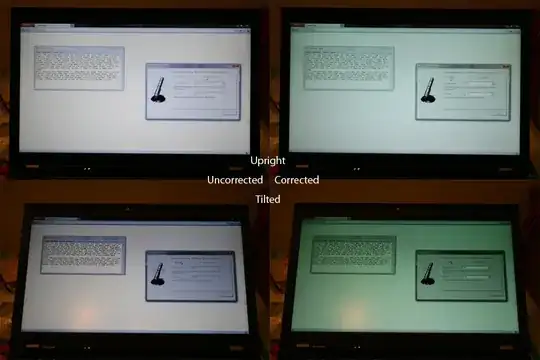
I am willing to sacrifice some linearity when I can avoid switching it off and on all the time. Can I use the Huey to create a display profile that describes the uncorrected state of the display?

Imre
  • 31,966
  • 11
  • 107
  • 177
AndreKR
  • 347
  • 1
  • 3
  • 12
  • 4
    If you are having this much of a change by tilting the monitor back, it sounds like you need an IPS panel. – dpollitt Oct 10 '11 at 00:01
  • 1
    Yes, IBM calls it "Flexview" and my old T42 had it, but apparently there are no T series Thinkpads with Flexview any more (this is a T520). I miss it. – AndreKR Oct 10 '11 at 00:14
  • My question about color management in Linux is basically asking about the same thing, and although I don't think it provides an answer for the MS Windows / Huey software, it may provide useful background for understanding what's going on. – mattdm Nov 07 '11 at 21:50

1 Answers1

1

Calibration kit like the Huey Pro measure colours displayed on your monitor to build a colour profile. Colour correction then uses this profile to get the colour right on your monitor. Because of this fact it is mandatory to have colour correction turned on when using these devices.

mattdm
  • 143,140
  • 52
  • 417
  • 741
Paul Round
  • 2,589
  • 16
  • 14
  • This doesn't make sense to me. So you mean, there actually is an internal profile that describes the monitor before color correction? – AndreKR Oct 19 '11 at 10:09
  • @AndreKR: There are generic profiles for things like CRT monitor or LCD monitor which ship with the OS. These provide a rough approximation for a particular class of device. Monitor vendors usually ship a profile with a monitor these days which gives a closer approximation for the panel the monitor has. Heuy Pro gives an exact profile for the actual device tested. – Paul Round Oct 19 '11 at 11:59
  • Yes, but that exact profile is valid only when color correction is on. I want an exact profile for the device with color correction switched off. – AndreKR Oct 19 '11 at 15:56
  • @AndreKR: unfortunately that's the big problem the profiles are the data used by colour correction. With it off there is no correction at all, not even the generic profiles are used you just get the raw RGB values sent straight to the device so lots of inconsistency across devices. – Paul Round Oct 19 '11 at 18:25
  • That is just not true. There are two steps in color correction with the Huey: 1. the color correction that is switched on/off in the Huey Software and affects the whole screen and 2. the color correction that is done using the display profile and only affects application that are color-aware. – AndreKR Oct 20 '11 at 12:35
  • @AndreKR: I think your getting confused here between colour workspaces and device correction. Display profiles are used to provide a consistent colour interface to your software regardless of the device. Colour aware software use profiles such as sRGB so they can interpret input colours accurately, this is why sRGB tagged images look different in colour aware and non-colour aware software. These are two halves of getting accurate colour from source to output. – Paul Round Oct 20 '11 at 13:06
  • Photoshop uses both display profile and image profile to mangle the colors before outputting it to the OS (you can verify this by taking a screenshot of the color picker in Photoshop) – AndreKR Oct 21 '11 at 17:07
  • @AndreKR: Photoshop introduces a bit more complexity. It uses a profile that maps colour to the monitors calibrated colour space. This is why you need both profiles for this to work properly. Unfortunately Huey will not produce a profile that maps directly to an uncalibrated monitor from within apps like Photoshop. This is what I ment when talking about the monitor profile providing a known starting point for colour managed applications to map to, its a two step process. – Paul Round Oct 21 '11 at 21:34
  • Do you mean, the display profile that the Huey software provides to the OS (and so to e.g. Photoshop) is the same for each and every Huey user and it just tries to bring the monitor as close as possible to this fixed profile using its color correction? I always thought that it generates the profile individually, but sure, it would be possible with a fixed profile, too. – AndreKR Oct 21 '11 at 22:11
  • @AndreKR: No, that is not quite the case. Different monitors have different ranges of colour that can be displayed. The profile supplied to photoshop detail the colour gamut of the monitor so that photoshop can decide what to do when mapping colour from the workspace profile which are out of range for the monitor. It can be set to either clip the colours or compress the range, a process referred to as rendering intent. – Paul Round Oct 22 '11 at 22:08
  • 1
    Take a look at http://photo.stackexchange.com/questions/14585/. I assume a similar thing applies in the case of the Huey software, and that what Andre is asking is to have "null" Video LUT (or whatever the equivalent is), and have the XYZ matrix used by color-aware applications be specified as working from that "uncorrected" starting point. – mattdm Nov 07 '11 at 21:46
  • @mattdm: Yes this is similar.. Mapping everything in one go is problematic because graphics cards have a lot of colour management built in which need to be set up to give ideal output for the attached monitor. Without it there is no way for the OS to understand the output device limitations. – Paul Round Nov 08 '11 at 19:34