14

I'm on Windows 8. I have the Fritz/ChessBase GUI since I bought both Fritz 12 and Houdini 3 Pro.

I would like to know how exactly can I download and install the free latest version (and most powerful version) of Stockfish.

I've found this website to download Stockfish: http://stockfishchess.org/

But after I click on the big green button that says "Download Stockfish 5 for Windows" I don't know what to do. Should I select "Save File" or "Open with"? And after that what do I do?

Please try to explain it step by steps because I'm not that good with computers.

.

.

@AlwaysLearningNewStuff: Thanks for your answer, but I did not succeed. I downloaded the file. I moved it to C:\Program Files (x86)\ChessBase. I clicked on "Create UCI engine".
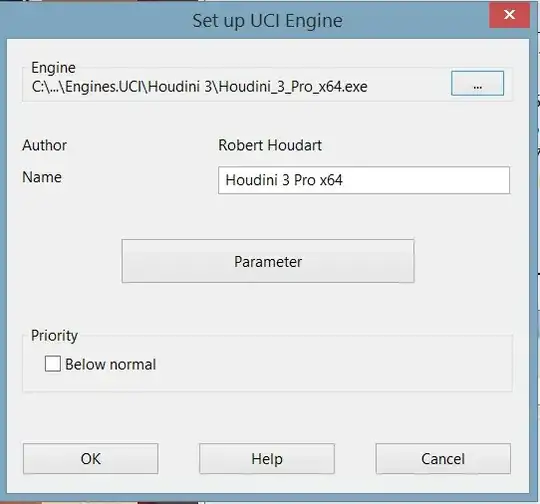
Then I clicked on the "..." button (which looks to be the "Browse..." button). I went in C:\Program Files (x86)\ChessBase.
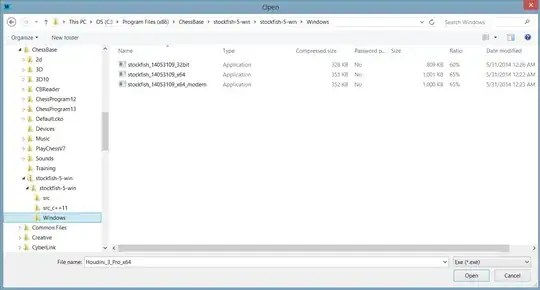
But then clicking on one of the three files does not work.

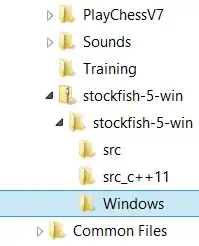
Maybe the problem comes from the fact that the icon for Stockfish is different than the the other icons:
Fate
  • 4,778
  • 2
  • 35
  • 69
  • You are always welcome. Good luck and best regards until next time :) – AlwaysLearningNewStuff Aug 10 '14 at 01:06
  • hey all i am not able to add engine to chessbase. I did as follows FRITZ8>>Stockfish done. But in chessbaase there was no as such option for add uci engine just it shows default engines wat to do??????????? –  Feb 19 '15 at 04:57
  • 1
    AlwaysLearningNewStuff's answer is right, try placing the stokfish engine out of program files folder (it has special permissions on windows 8), try c:\chess\engines – Fernando Gonzalez Sanchez Feb 19 '15 at 21:05

1 Answers1

13

First download StockFish. You click on the button shown in the below image and choose "Save as". It will be saved as .rar file, which you can open with WinRar, 7Zip or similar utility...

enter image description here

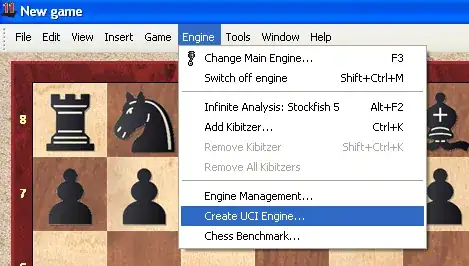
Then you unzip it ( put it where you want ). After that run Fritz, and choose Engine -> Create UCI engine like in the picture below:

enter image description here

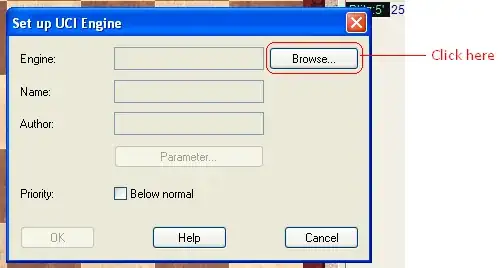
The following dialog box will pop up, after which you need to press Browse button:

enter image description here

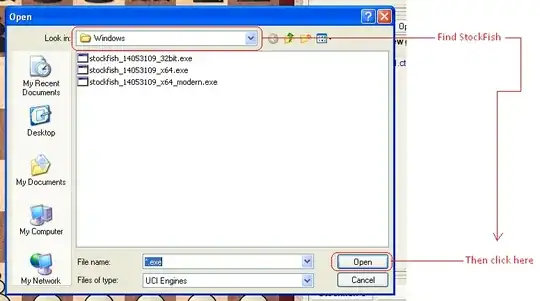
Then you will see a dialog box that will help you find StockFish. Once you find it, select it and click Open ( in the picture below I didn't click on the StockFish when creating screen capture; sorry, I just forgot to do it ) :

enter image description here

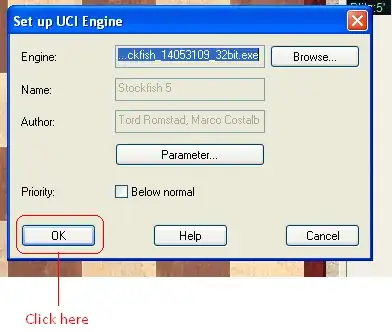
After Fritz finishes loading engine your dialog box should look something like the image below. Then just click on the OK button:

enter image description here

That should do it. I think that the procedure is the same for ChessBase. To use StockFish instead of Fritz, press F3, select StockFish from the list of engines in the dialog box that pops, and click OK button. Wait a few seconds and you will be good to go.

That's all, if you need further help leave a comment. Best regards.

AlwaysLearningNewStuff
  • 11,664
  • 2
  • 30
  • 57
  • I answered you by editing my question. – Fate Aug 09 '14 at 19:56
  • It seems to me that you did create StockFish successfully, but if you wish to play against it you must load it. To do that press F3, and select StockFish from the list, then click OK. Please try to do this and tell me what happens. – AlwaysLearningNewStuff Aug 09 '14 at 20:55
  • No I don't think I created Stockfish successfully. When I press F3, Stockfish is not on the list (there is only Fritz 11, Fritz 12, Houdini 3 x64 and Houdini 3 Pro x64). – Fate Aug 09 '14 at 21:03
  • @Petrosian: Did you set Houdini ( or any other program ) as your main engine? This is important, please tell me as soon as possible. – AlwaysLearningNewStuff Aug 09 '14 at 21:52
  • Yes, when I click on Engine > Change Main Engine, it seems that the main engine is Houdini 3 Pro x64. – Fate Aug 09 '14 at 22:01
  • @Petrosian: Change it back to original engine ( Fritz if I am right ), and repeat what I have said. – AlwaysLearningNewStuff Aug 09 '14 at 22:39
  • I tried with each one of the 4 engines, and it did not work. – Fate Aug 09 '14 at 23:31
  • @Petrosian: I tried with each one of the 4 engines, and it did not work. What does this mean? I cant read your mind. Did you press F3 and changed the main engine to Fritz? Or did you try to create UCI with all 4 engines? What exactly did you do? – AlwaysLearningNewStuff Aug 09 '14 at 23:38
  • I clicked on Engine > Change Main Engine, and then I selected Fritz 12 (as the "main engine"). Then I clicked on "Create UCI engine" and tried to install Stockfish, but it did not work. (And I also tried the same thing with the 3 other engines just in case but it didn't work either.) – Fate Aug 09 '14 at 23:51
  • 2
    I just realized what my mistake was. I did not understood correctly the part "Then you unzip it ( put it where you want )." I searched on Google, and to unzip a file we have to right click on it and then click on "Extract all". So I did just that, and now it works, Stockfish has been installed successfully. I even also installed another engine called "Gull 3". Thank you AlwaysLearningNewStuff for all the help you provided me. – Fate Aug 10 '14 at 00:30
  • @Petrosian you should update your question again. – Xonatron Dec 10 '14 at 21:06
  • What is the difference between _modern and not? – Xonatron Jan 03 '15 at 04:14