10

I am new to Mindstorms (but in my day job I am a programmer).

I want to make my robot do one thing if the touch sensor on port 1 is pressed, and do something different if the touch sensor on port 2 is pressed.

If nothing is pressed, I want it to keep driving straight ahead.

I can see how to tell it to drive along until one of the sensors is triggered. I.e. "drive along until sensor 1 is pressed", but I can't see how to say "... until either sensor 1 or sensor 2 is pressed".

In answer, it would be great if you could:

  • tell me the blocks to use
  • give me a screenshot of a program
  • link to a program which has a similar effect
jncraton
  • 40,265
  • 10
  • 119
  • 237
AJ.
  • 535
  • 1
  • 4
  • 10

4 Answers4

4

I believe one possible answer can be found in the sample program for the color sorter in the Mindstorms control software. The technique that kit uses is to create a series of nested if/then loops:

if (Color == red) {
  //do red things here
} else {
  if (Color == blue) {
    //do blue things here
  } else {
    if (Color == green) {
      //do green things here
    } else {
      if (Color == yellow) {
        //do yellow things here
      } else {
        //default actions here
      }
    }
  } 
}

Using this as a template, you could use a structure like:

if (Touch Sensor 1 == Pressed) {
  // Special Action 1 (i.e. turn left)
} else {
  if (Touch Sensor 2 == Pressed ) }
    // Special Action 2 (i.e. turn right)
  } else {
    // Default Action (i.e. drive forward)
  }
}

Hope this helps - I don't have quick access to the Mindstorms environment right now or I could set up a quick screen shot. I can only refer you to the ColorSorter program in the samples.

Matthew Bernhardt
  • 406
  • 1
  • 3
  • 7
  • Thanks, matthew. This is the structure I've arrived at, and it seems to work, but I'm intrigued by @joubarc's idea of concurrency. I'll have to try that out too. – AJ. Dec 28 '11 at 11:13
2

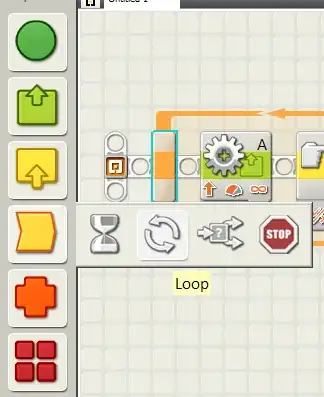
It sounds like you will need to create an infinite loop block to constantly check which touch sensors are being pressed and if not, carry on with whatever instruction you wish. The loop block can be found under the flow category:

enter image description here

I recommend you read through the instructions (listed under Help > Contents and Index... in the LEGO MINDSTORMS NXT software).

Ambo100
  • 17,591
  • 7
  • 78
  • 169
1

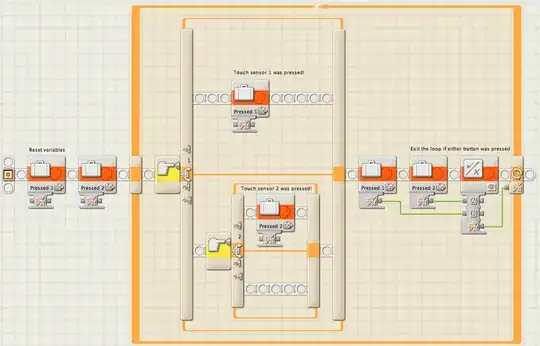
I had exactly this question. Based on Matthew's answer, I got this working. Here is a screenshot of the My Block I created to do this: TwoSwitch.

enter image description here

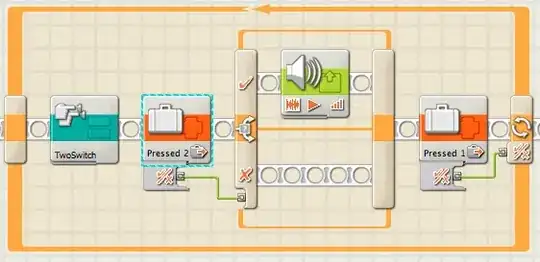
TwoSwitch sets one of two variables to true: Pressed 1 or Pressed 2. You can then act on those values using tests. Here, I'm looping until button 1 is pressed. If button 2 is pressed, I play a sound and get another button press.

enter image description here

metadaddy
  • 111
  • 3
1

You could also have 3 different concurrent tasks - one which is you main "go forward" program, and two others which listen for sensors and do things accordingly.

Joubarc
  • 21,187
  • 2
  • 71
  • 136