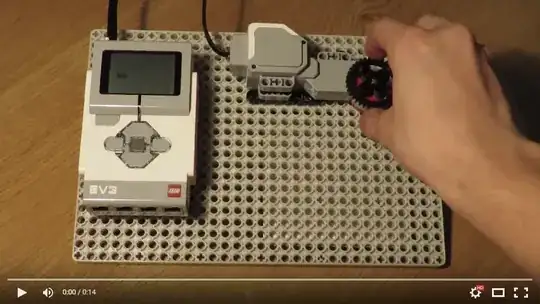
Use a Motor as Input
You may be limited by the amount of touch sensors you can use, but you have one very useful form of input that you may not be aware of.
EV3 motors have the ability to provide a value based on rotation in degrees. Adjusting the rotation of the motor by hand, you can input very precise numbers quickly. To rotate the motor easily, attach any Technic wheel/gear to the motor using an axle.
Programming a Basic Dial Input
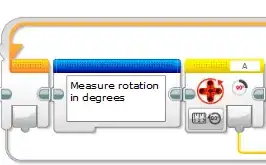
Create a unlimited loop block, this will ensure the current rotation value is always updated. Place a rotation sensor block, set to measure in degrees.
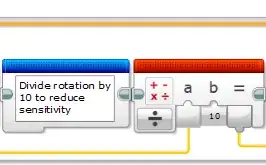
The rotation sensor is very sensitive, it's almost too sensitive because it makes it very difficult to select a number without jumping to another. I recommend you divide the output from the previous block by any number between 10 to 70 to decrease the sensitivity. (10 being the most sensitive).
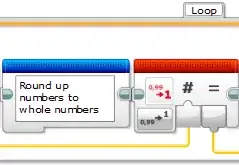
The divided numbers are now non-integers, we don't want to be able to take out a fraction of a dollar/pound or whatever currency you are using.
Use the round block to round the divided numbers up to a whole number.
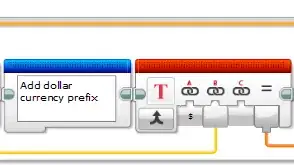
Optional: Add a currency prefix. You can use the text block to add a currency prefix, in this case I used the $ sign. EV3 only excepts the $ currency in text inputs. If you would like to use a different currency you would have to render it as an image.
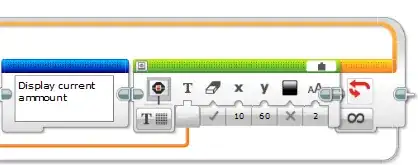
Display the current amount selected using the display block.
Program Overview
Working Example